Welcome to the reference for the HyperX Solver Application Programming Interface.
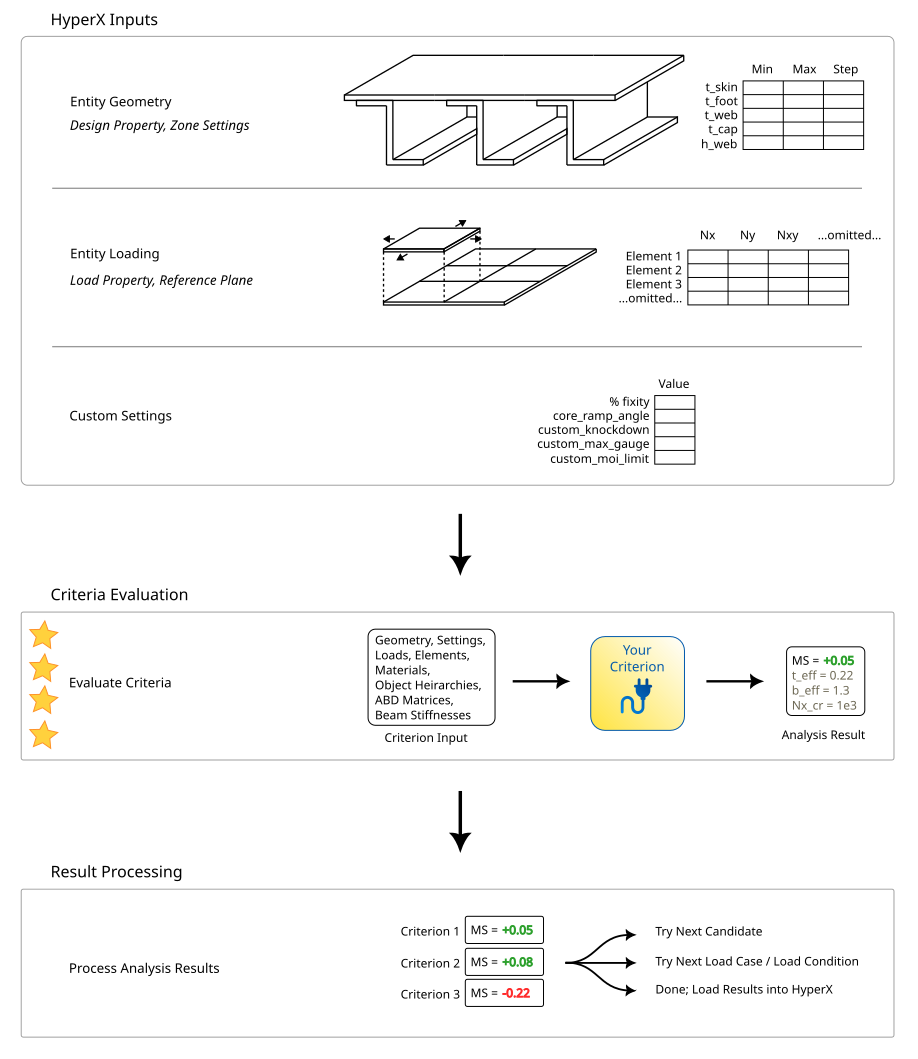
Fundamentally, a Solver criterion takes an ICriterionInput and returns an AnalysisResult. One or many criteria communicate their configuration to HyperX via an implementation of the abstract CriterionModule. All criteria in a module are displayed together in a HyperX Failure Mode.
The following diagram describes analysis criteria in the context of the HyperX Solver. Solver supports both panel and beam analysis.
Further reading:

- Quick Start explains how to quickly set up a new project from stratch.
- Key Types gives a high level overview of the key types, methods, and properties in the API.
- Object Labels shows a diagram for each of Solver's concepts.
- Sample Calcs explains how to enable sample calcs for your criteria.
- Preprocessing explains how to share common preprocessing steps between related criteria.
- External Tools explains how to call external DLLs or executables from a custom criterion.
- Debugging explains how to debug custom Solver criteria in Visual Studio.